



What is mobile programming?
As tech enthusiasts, you've studied and trained with a passion to become a programmer. You're probably familiar with terms like Web Developer and Mobile Developer, right? These are names born in the world of information technology and are often collectively called "coders." However, these two types of coders develop software on two different platforms.
While Web Developers build and create applications on the web platform, Mobile Developers are those who develop applications for mobile devices. The products of Mobile Developers are applications that run on mobile platforms – mobile apps.
Common mobile programming methods
To pursue a career as a mobile developer, there are three branches you can choose from:
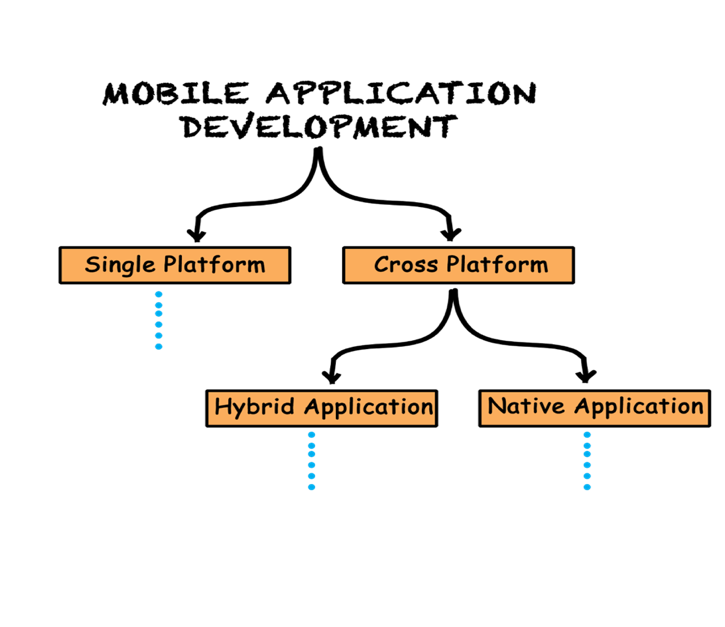
- Single Platform Development
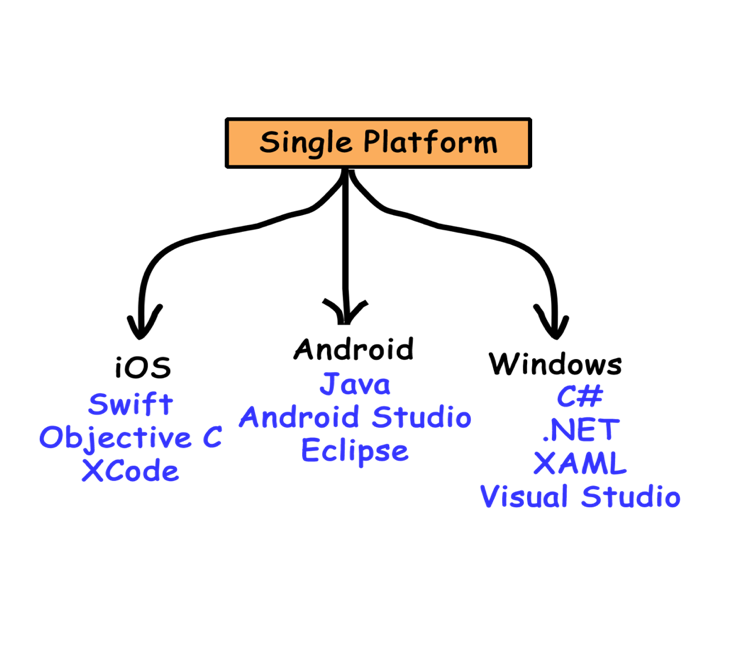
Here we will discuss developing applications for each mobile operating system using their own tools. The leading mobile operating systems are: Android, iOS, and Windows Phone.
- Cross-Platform Development
If you're planning to develop a single mobile application across two or more platforms, cross-platform development tools will definitely be useful. Two types of cross-platform development techniques are: Hybrid Applications and Native Applications.
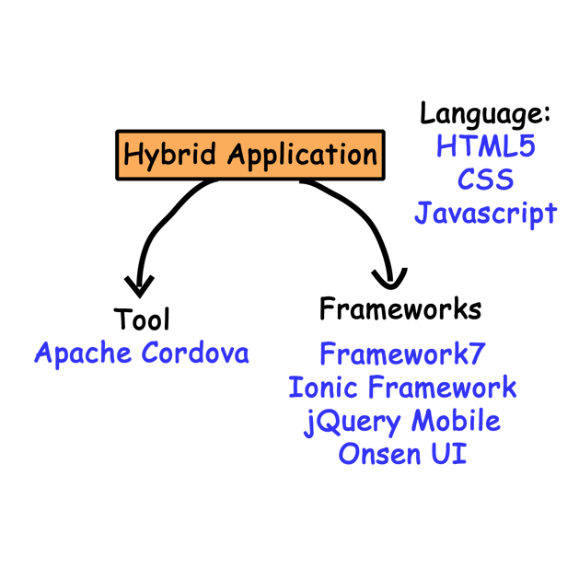
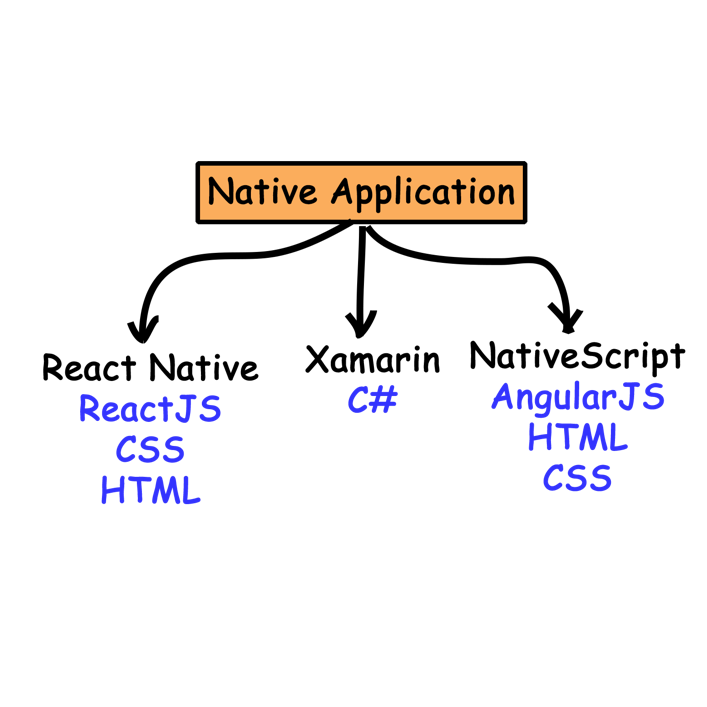
How do web development students approach mobile programming?
For students with a background in web development, Hybrid Applications is a good choice. Hybrid Application development tools are designed to help web developers easily develop and deploy applications for mobile platforms. Developing Hybrid Applications essentially means developing an HTML5 application for mobile devices.
Ionic Framework
Ionic is an open-source framework that effectively supports mobile application interface design using web technologies (HTML, CSS) and integrates front-end programming with modern frameworks such as Angular, Vue, and React. The following are the steps to build a mobile application with Ionic.
Setting
npm install -g @ionic/cli
Create an application
ionic start PolyApp option
Execute the application
ionic serve
That's all we need to create a mobile application that can be deployed on any platform, such as iOS or Android.
Here's an example of a mobile application with two screens:


Figure 1: Home screen Figure 2: Contacts screen
Perform design and programming of the processing
- Design
To design the user interface for an application, Ionic provides Components, which are predefined elements or extensions. Components allow for the rapid creation of user interfaces for applications. Ionic offers many components, such as tabs, lists, cards, etc.
To design, you find the appropriate component for your application screen at https://ionicframework.com/docs/components, Then, design the user interface in the application component's template (here, using the Angular Framework, the interface is designed in the HTML file and the code is a class with Typescript).
The home screen is designed as follows, entirely using HTML tags and the ionic-cart component.
<ion-header [translucent]=”true”>
<ion-toolbar>
<ion-title>
Gate
</ion-title>
</ion-toolbar>
</ion-header>
<ion-content [fullscreen]=”true”>
<ion-card>
<ion-img src=”./assets/images/hcm.jpeg”>
<ion-card-header>
College
FPT POLY TECHNIC
</ion-card-header>
<ion-card-content>
With its educational philosophy of "Learning by Doing - Practical Application", FPT Polytechnic College
Aiming to train high-quality human resources through real-world project-based methods.
</ion-card-content>
</ion-card>
</ion-content>
- Processing programming
The contact list screen is designed using a list component, and the user interface is programmed using Angular2+ (it can also be coded using other frameworks like React or VueJS), a framework that web design students have already learned.
<ion-header [translucent]=”true”>
<ion-toolbar>
<ion-title>
Contact us
</ion-title>
</ion-toolbar>
</ion-header>
<ion-content [fullscreen]=”true”>
<ion-list>
<ion-list-header>
OFFICE SYSTEM
</ion-list-header>
<ion-item *ngFor=”let contact of contacts”>
<ion-avatar slot=”start”>
<img src=”./assets/images/{{contact.imageUrl}}”>
</ion-avatar>
<ion-label>
<h2>{{contact.name}}</h2>
<h3>
<ion-icon Name=”navigate-circle-outline”>
{{contact.address}}
</h3>
<p>
<ion-icon Name=”call-outline”>
{{contact.phone}}
</p>
</ion-label>
</ion-item>
</ion-list>
</ion-content>
With the data processing performed in the Typescript file as follows:
export class Contact Page {
contacts=[
{
name:"Hanoi Branch",
Address: "FPT Polytechnic Building, Trinh Van Bo Street, Nam Tu Liem District, Hanoi",
phone:"(024) 7300 1955″,
imageUrl:”hn.jpeg”
},
{
name:"Ho Chi Minh Facility",
Address: 778/B1 Nguyen Kiem Street, Ward 4, Phu Nhuan District, Ho Chi Minh City,
phone:”028 62523434/0901 660 002″,
imageUrl:”hcm.jpeg”
},
{
name:"Da Nang Branch",
Address: 137 Nguyen Thi Thap Street, Hoa Minh Ward, Lien Chieu District, Da Nang City,
phone:"(0236) 3710 999″,
imageUrl:”dn.jpeg”
},
{
name:"Can Tho Branch",
Address: "No. 288, Nguyen Van Linh Street, An Khanh Ward, Ninh Kieu District, Can Tho City",
phone:"(0292) 7300 468″,
imageUrl:”ct.jpeg”
},
{
name:"Central Highlands Facility",
Address: "Residential Area 8, Tan An Ward, Buon Ma Thuot City, Dak Lak Province",
Phone: (0262) 355 5678,
imageUrl:”tn.jpeg”
}
]
constructor() {}
}
So, you now have a mobile application with two screens like the one above, it's really simple, isn't it? Only the interface design is based on the extended tags or components of the Ionic framework, while the programming for handling the front end is exactly the same as the subjects taught in web design.
Therefore, web development students can quickly build mobile applications. So what are you waiting for? Add Ionic to your repertoire of skills!.
Author: Thy Dao Quoc - Date written: March 22, 2023
Category: Training program, IT - Website Design, IT - Software Applications, Information Technology - Software Applications, TECHNOLOGY AND ENGINEERING SECTOR

0 thoughts on “Sinh viên ngành Web lập trình ứng dụng di động được không ?”